iCloud Storage vs Phone Storage
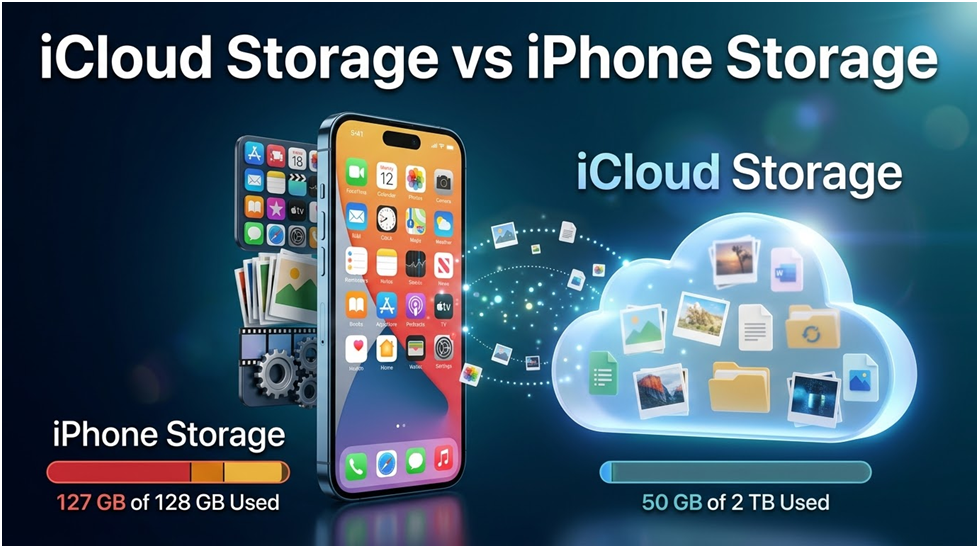
Is iCloud storage and phone storage the same? iCloud storage vs iPhone storage are two distinct categories. Discover why purchasing iCloud space won’t free up your phone, what counts against each, and the true solution.
iPhone Storage vs iCloud Storage: What Each Contains and What Counts Against It
iCloud storage and iPhone storage are two entirely different categories that merely happen to share the same brand name. iCloud storage is cloud storage in your Apple Account that resides on Apple’s servers, whereas iPhone (device) storage is the actual capacity inside the phone in your possession.
The first is located at Settings > General > iPhone Storage, and the second is located at Settings > [your name] > iCloud > Manage Account Storage.
Anyone who notices a storage warning, is unsure which one is full, and wants to know precisely what counts against each might use this guide.
In a Nutshell
- While iCloud storage is your cloud plan (5GB free or 50GB/200GB/2TB+), iPhone storage is the set physical capacity on the device (64GB, 128GB, 256GB, etc.).
- Applications, iOS, and any offline media are counted against device storage; backups, iCloud Drive, iCloud Photos originals, Mail, and iCloud Messages are counted against iCloud.
- Purchasing additional iCloud storage just increases the cloud bucket; it does not free up your iPhone. By storing full originals on iCloud and tiny previews on the phone, “Optimise iPhone Storage” blurs the distinction.
- On-device cleansing, not a larger iCloud plan, is the solution if the phone is indeed full.
What Distinguishes iCloud Storage from Storage on an iPhone?
The soldered-in flash memory that comes with your iPhone is called storage; a 128GB iPhone is always a 128GB iPhone. It contains iOS, all installed apps, and every file, picture, video, or song that is physically on the device.
Backups, synced images, documents, and more are all possible with iCloud storage, an online plan linked to your Apple Account and shared across all of your Apple devices.
People suppose one feeds the other because their names are similar. They do not share the same features; each has a unique meter, a “full” warning, and a specific clearing procedure.
The location of the data is the quickest way to create a distinction between iCloud storage and iPhone storage. If erasing something still allowed you to access it on the same phone without the internet, it was using device storage. It is dependent on iCloud if its existence is only due to cloud syncing.
Why Is “Optimise iPhone Storage” Perceived as Ambiguous?
The two modes available in iCloud Photos, “Download and Keep Originals” and “Optimise iPhone Storage,” can be found under Settings > [your name] > iCloud > Photos.
The two buckets feel knotted because of the optimise mode. When it is enabled, your phone only retains a condensed, space-saving preview while the full-resolution original is stored in iCloud. iOS silently downloads the original on demand, so when you tap it, the image seems exactly the same.
This feature actually helps a 64GB phone appear to have a 200GB library. However, it also implies that your photo collection is simultaneously divided between the two buckets, so a single album may count largely against iCloud and somewhat against the device.
Optimise mode is frequently the reason why someone says, “I deleted photos and nothing changed,” since the bulky originals were already in the cloud rather than on the phone.
Does Erasing One Have an Impact on the Other?
Whether or not synchronization is enabled determines the outcome. Since the phone and cloud are mirrored when iCloud Photos (or iCloud Drive, or Messages in iCloud) is enabled, deleting a synced photo on the device also deletes it from iCloud and all other signed-in devices.
The most frequent reason for unintentional cloud deletions is the lack of awareness about how iCloud synchronization works.
- When iCloud Photos is enabled: Removing a picture takes it out of both iCloud and the device (it remains in Recently Deleted for about 30 days on both).
- When iCloud Photos is disabled: Removing a picture from the phone merely frees up device space; cloud copies remain intact.
- When an app is deleted: Device storage is freed up, but its iCloud backup data can still be there until you delete it via iCloud storage management.
- When an old device backup is deleted in iCloud: Only cloud space is freed; the phone remains unchanged.
Keeping items in the cloud before removing local copies is a safe strategy if you want to clear the device without losing your library. Check out how to remove images off your phone while keeping them in the cloud.
Why Purchasing iCloud Storage Does Not Make Your Phone Free
This is the error that costs consumers money: after upgrading their iCloud subscription from 5GB to 200GB, the phone flashes “iPhone Storage Almost Full,” and the warning reappears.
The cloud bucket is only expanded by upgrading iCloud. Your phone’s hardware chip cannot have a single byte added to it.
When iCloud is full, such as when backups cease, iCloud Photos can’t sync, or iCloud Drive is full, a larger iCloud plan is helpful. For a complete gadget, it has no effect.
Even the language of the two alerts differs: “iCloud Storage” or “Not Enough Storage” signals originate from the cloud plan, but “iPhone Storage” warnings originate from the device.
Before you grab your wallet, read which word comes up. (See iCloud storage full, but images are off: what is using space?) If your iCloud is full but image sync is off, the reason is typically due to backups or drives.
Can These Parameters Be Changed and Deleted from Each Bucket Without Risk?
Yes, provided you are aware of which bucket you are touching. Both storage screens are read-only reports until you tap a delete action; thus, viewing either one has no effect.
Enabling “Optimise iPhone Storage” is secure and reversible; your originals remain in iCloud, and you can always go back to storing complete copies.
Since a synchronized photo remains in Recently Deleted for around 30 days on each signed-in device, deleting it is also reversible.
Removing synchronized content while presuming it’s “just the phone copy” is the only truly dangerous action. That delete is a cloud delete if iCloud Photos is enabled.
The safe rule is to make sure that everything irreplaceable is actually backed up first and that sync is enabled before clearing anything.
FAQ
Will My iPhone Have Additional Space If I Purchase More iCloud Storage?
No, purchasing iCloud storage doesn’t add anything to the phone’s hardware chip; it just expands your cloud subscription.
You don’t need a larger iCloud subscription if the device is full; instead, you require on-device cleansing, which entails removing local media, apps, and caches.
Why Does My iCloud Have a Lot of Space, but My iPhone’s Storage Is Full?
Since they are distinct buckets, one may be almost empty while the other is full.
Large videos, full-resolution photographs, and several apps are typically kept locally on a packed phone with a sizable cloud, which only affects device storage.
Does Erasing a Picture from My iPhone Also Erase It from iCloud?
This only happens if you have enabled iCloud Photos. Since the phone and cloud are mirrored when sync is enabled, the delete affects both (and stays under Recently Deleted for about 30 days).
You only have free space on the device when sync is off.
What Distinguishes iCloud Photos from iCloud?
iCloud is an all-inclusive cloud account that includes Mail, Drive, backups, and more. One of its features is iCloud Photos, which syncs your photo collection.
You may use iCloud for everything else and turn it on or off separately.
When the Phone Is Full, Where Do I Begin?
A larger iCloud plan is not the best solution if the notice indicates “iPhone Storage,” as the solution is on the device.
Choose what should be deleted first when storage is full, and look for related rows, such as System Data on iPhone and Android.
The storage cleaning app and Cleanor for iOS locate the biggest local files and duplicates on your phone without any uploads in order to automate the on-device portion.

Microsoft Copilot vs ChatGPT – The Best AI Assistant for Business Productivity

How to Determine if Your PC is Bluetooth-enabled

UNDERSTANDING THE DIFFERENCE BETWEEN CPU AND GPU
About Author
